


How does SSRF work?
Server-side request forgery happens when an application takes a URL or hostname from user input and makes a server-side request to it. The attacker cannot reach the internal network from outside, but the server can, so pointing that request inward turns the server into a proxy for the attacker.
The vulnerable feature almost always looks like product work: a link-preview box, an avatar-by-URL uploader, a webhook target, a PDF or document importer, an XML parser that resolves external entities. Each takes a URL and has the server fetch it.
Here is a preview feature doing what it was built to do, then doing what it was not:
POST /api/link-preview HTTP/1.1
Host: acme.example
Content-Type: application/json
Cookie: session=user_4821

{"url": "http://169.254.169.254/latest/meta-data/iam/security-credentials/"}
HTTP/1.1 200 OK
Content-Type: application/json
{"title": "app-ec2-role", "body": "app-ec2-role"}The server fetched a link-local address it should never touch on a user's behalf. The next request down that path (/latest/meta-data/iam/security-credentials/app-ec2-role) returns temporary cloud credentials. The full chain from a URL field to credential theft is walked through in SSRF to cloud takeover; this page covers the vulnerability class, its variants, and the fix.
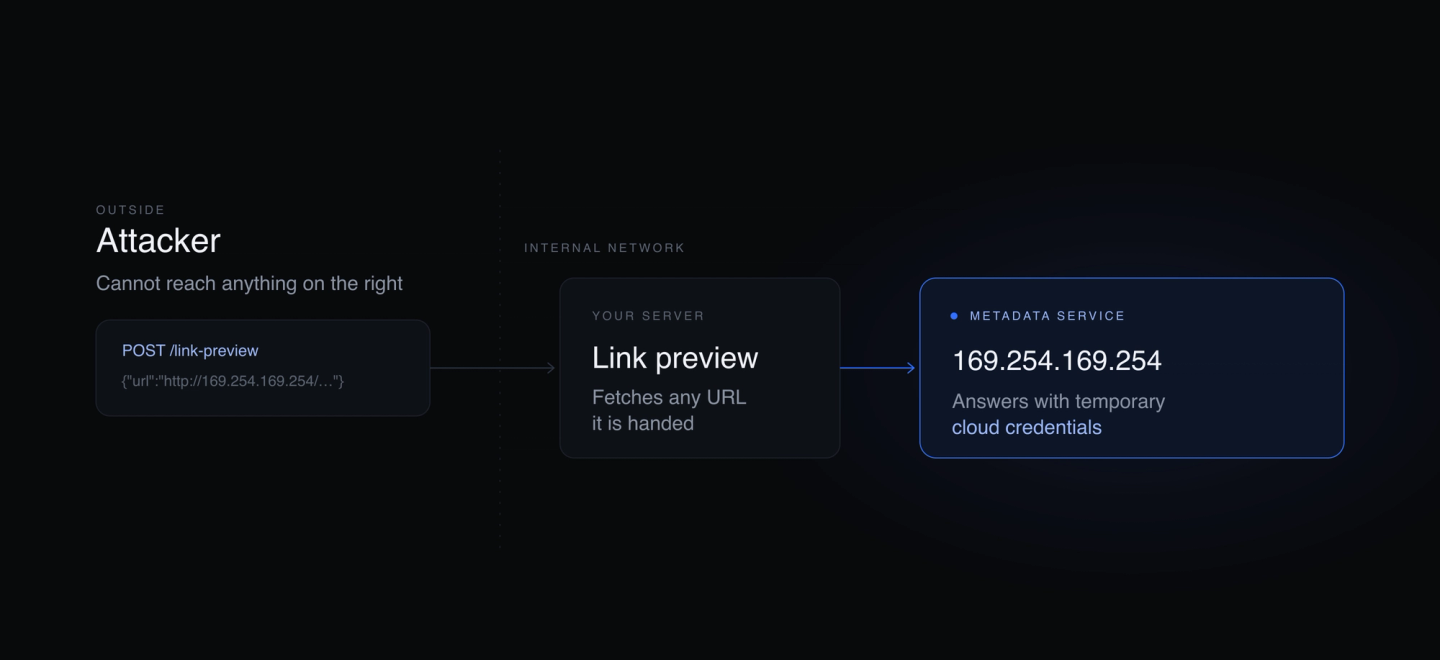
What does SSRF look like in practice?
The impact depends on what the server can reach and what it hands back.
- Metadata endpoints. The instance metadata service at
169.254.169.254returns IAM credentials on hosts still allowing the unauthenticated version. This is the highest-value target in a cloud environment. - Internal services. Admin panels, databases, message queues, and internal APIs that trust anything originating from inside the network. SSRF reaches them through the vulnerable server.
- Blind SSRF. The response never returns to the attacker. Exploitation relies on side channels: response timing, status-code and error-message differences that reveal whether an internal port is open, or an out-of-band callback (a DNS or HTTP hit on a hostname the attacker controls) that proves the server connected.
- Non-HTTP schemes.
file://reads local files,gopher://anddict://smuggle arbitrary bytes to services like Redis or SMTP that speak line-based protocols.
The 2019 Capital One breach is the widely cited real-world case. As publicly reported, an SSRF flaw in a misconfigured web application firewall on an EC2 instance was used to query the metadata service, retrieve the instance role's temporary credentials, and read data from S3 buckets affecting roughly 106 million applicants. Treat that as the publicly reported account, summarized in Krebs on Security.
Filter bypasses
Most SSRF defenses fail because they treat the problem as string matching on the URL. The common bypasses:
| Bypass | Example | Why the filter misses it |
|---|---|---|
| Alternate IP encodings | 2130706433, 0x7f000001, 0177.0.0.1 | All decode to 127.0.0.1, none match the literal string |
| Redirect following | Attacker host returns 302 to 169.254.169.254 | The filter validates the first URL, the client follows the redirect |
| DNS rebinding | Hostname resolves public, then private | Filter check and client connect resolve at different moments |
| Decimal and IPv6 forms | ::ffff:169.254.169.254, enclosed alternates | Not on a string blocklist |
How do you test for SSRF?
The goal is to prove the server made a request you controlled, not just that a field accepts a URL.
- Find the sinks. List every input that becomes a server-side request: URL fields, webhook and callback settings, image or file importers, PDF and HTML renderers, XML and SVG parsers, and any parameter named
url,uri,dest,redirect,feed, orwebhook. - Point it inward. Try
http://127.0.0.1,http://localhost,http://169.254.169.254/latest/meta-data/, and RFC 1918 ranges (10.0.0.0/8,172.16.0.0/12,192.168.0.0/16). Watch response body, status code, and timing for differences between a reachable and an unreachable target. - Set an out-of-band canary. For blind cases, point the field at a hostname you control (a Burp Collaborator or equivalent) and watch for the DNS or HTTP callback. A DNS-only hit still proves the server resolved your name.
- Escalate the reachable ones. Once an internal request lands, walk the metadata tree for credentials, enumerate internal ports, and try non-HTTP schemes if the client supports them.
- Defeat the filter. If a blocklist rejects obvious payloads, try the encodings and the redirect and rebinding techniques above, and confirm which one the specific client falls to.
How do you fix SSRF?
SSRF is a trust decision, not a parsing problem. Blocklists lose because there are too many ways to spell an internal address. The pattern that holds is allowlist plus resolve-and-pin: decide the exact destinations the server may reach, resolve the hostname yourself, verify the resolved address, then connect to that address so the client cannot re-resolve to something else.
const dns = require("dns").promises;
const net = require("net");
const http = require("http");

const ALLOWED_HOSTS = new Set(["images.acme-cdn.example"]);

async function safeFetch(rawUrl) {
  const url = new URL(rawUrl);
  if (url.protocol !== "https:") throw new Error("scheme not allowed");
  if (!ALLOWED_HOSTS.has(url.hostname)) throw new Error("host not allowed");

  const { address } = await dns.lookup(url.hostname);
  if (isPrivate(address)) throw new Error("resolved to internal address");

  // Pin the connection to the address we validated so the client
  // cannot re-resolve the name (defeats DNS rebinding).
  return new Promise((resolve, reject) => {
    const req = http.request(
      { host: address, servername: url.hostname, path: url.pathname, protocol: url.protocol },
      resolve,
    );
    req.on("error", reject);
    req.end();
  });
}

function isPrivate(ip) {
  if (net.isIPv4(ip)) {
    const [a, b] = ip.split(".").map(Number);
    return (
      a === 127 || a === 10 || a === 0 ||
      (a === 172 && b >= 16 && b <= 31) ||
      (a === 192 && b === 168) ||
      (a === 169 && b === 254)
    );
  }
  return true; // reject IPv6 unless you explicitly need it, then check it too
}
What does not work on its own:
- A WAF. It inspects the inbound request, not the outbound one the server makes, and the encodings above slip past signature rules.
- A blocklist of bad IPs or hostnames. New encodings and redirects defeat it.
- Validating the URL then fetching by hostname. DNS rebinding changes the answer between the check and the connection. You have to resolve once and pin.
Fix it at the platform layer too, so an app bug is not automatic credential theft: enforce the token-based instance metadata service so a stray GET cannot lift credentials, and block egress to 169.254.169.254 from workloads that never need it. Never echo the raw upstream response back to the caller.
SSRF vs open redirect
An open redirect makes a victim's browser navigate to an attacker-chosen URL; the request comes from the client. SSRF makes the server send the request. The two combine: an open redirect on an allowlisted host is a common way to satisfy an SSRF filter and then bounce the server to an internal target.
[ Sources ]
Written by Parameter · Last reviewed